Instagram Post Templates Coach: Grow Your Audience Organically
For course creators and coaches, the constant churn of content creation is a major bottleneck. You have the expertise, the course, and the drive, but translating that into daily, engaging Instagram posts can feel like a full-time job on its own. The struggle to maintain a consistent, professional, and valuable feed often leads to burnout or an inconsistent presence that confuses your audience. This is where a strategic toolkit like Instagram Post Templates Coach changes the game. It’s not just about having pretty graphics; it’s about having a system designed for growth, authority, and connection.
A Visual Strategy for Authority and Connection
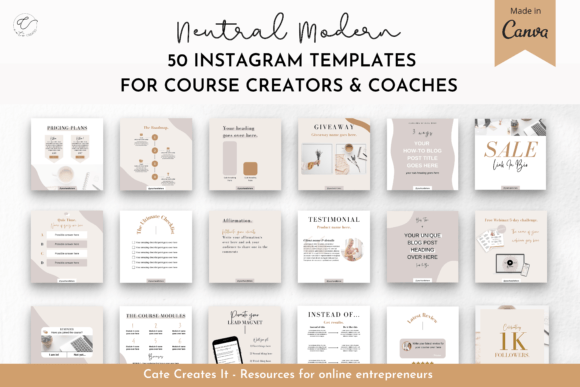
At its core, Instagram Post Templates Coach is a collection of 50 editable Canva templates built on a specific design philosophy: to foster organic growth through value and cohesion. The visual personality is clean, modern, and authoritative. It avoids overly trendy or playful aesthetics in favor of a professional look that builds trust—essential for anyone selling knowledge or services. The style leans into clear typography, balanced layouts, and strategic use of space, ensuring your message is always the hero. This isn't a chaotic collection of random graphics; it's a curated system where every template, from a course promo to a testimonial, speaks the same visual language, creating a feed that feels intentional and binge-worthy.
The true appeal lies in its practicality. These templates are designed as a starting point for your brand identity. They provide a professional structure that you can customize with your brand colors, fonts, and images. This approach solves two critical problems: it eliminates the "blank canvas" paralysis and ensures that every post contributes to a cohesive Instagram feed. The inclusion of specific post types like webinar promo, lead magnet announcements, and this vs. that comparisons shows a deep understanding of the marketing funnel a coach needs to navigate.
Where This Template System Excels
While the name specifies Instagram, the utility of these design assets extends far beyond a single platform. Think of them as versatile social media graphics starters. The quote templates and tip templates are perfect for repurposing into Pinterest pins or Facebook posts. The blog post templates can drive traffic from any platform back to your website. For a small business owner, using these templates ensures your messaging on Instagram, your newsletter teasers, and even your presentation slides share a common visual thread, reinforcing professionalism and brand perception.
The strength of a system like this is in its influence on key metrics. A cohesive feed, built with these templates, directly impacts readability and visual hierarchy. When your audience knows what to expect visually, they can focus on your message. A checklist post has a clear structure that guides the eye, while a notification post uses contrast to highlight urgency. This consistency builds recognition. Followers start to recognize your content in their feed before they even see your name, which is a powerful step toward becoming a known expert. The goal of engagement is baked into the design—posts are structured to encourage saves, shares, and comments by delivering clear, valuable information in an easily digestible format.
Practical Guidance for Implementation
Adopting any new design toolkit requires a thoughtful approach. First, when you open the Canva file, resist the urge to use all 50 templates at once. Start by selecting 3-5 core post types that align with your immediate goals. If growing your email list is the priority, focus on the lead magnet and announcement templates. If you're launching a course, lean into the course promo and webinar promo designs. This prevents overwhelm and helps you build a focused content strategy.
Evaluating fit is crucial. While the templates are designed for coaches and course creators, their clean aesthetic can work for many service-based businesses. Ask yourself: Does the visual style align with the personality of my brand? If your brand is highly energetic and bold, you may need to customize the color palette more aggressively. If it's calm and authoritative, the provided styles might be a perfect match. The key is to see the templates as a flexible framework, not a rigid final product.
When customizing, pay close attention to font pairing and readability. The templates likely come with suggested typefaces. If you change them, maintain the hierarchy: a bold, clear sans serif font for headlines, and a highly legible serif or sans serif for body text. Avoid overly decorative script fonts for large blocks of text, as they can harm readability on mobile screens. Test your customized templates on your phone—what looks good on a desktop Canva screen might be too small or cluttered on Instagram's mobile feed.
Finally, understand the licensing. Since this is a digital product for commercial use, you are typically purchasing the right to use the templates to create graphics for your own business or for clients. This makes it a scalable asset. You can use the same template system to maintain brand consistency across multiple client accounts, saving time while delivering professional results. The included PDF with instructions will be your guide to accessing and editing the files efficiently.
In the end, Instagram Post Templates Coach is more than a set of pretty graphics. It's a strategic partner in your content creation process. It handles the heavy lifting of design consistency and visual strategy, freeing you to focus on what you do best: sharing your expertise, connecting with your audience, and growing your business with purpose and professionalism.