Create Royal Pet Portraits with Vintage Templates
Have you ever imagined your family pet or a loved one depicted in a classic, oil-painting style? That look of aristocratic elegance isn't reserved for museum halls anymore. With the right tools, you can transform a simple digital photograph into a timeless masterpiece. This process is surprisingly straightforward and requires only a few key elements: a good photo, a layer-based graphics program, and a high-quality design asset like the 10 Vintage Portrait Templates Set 16.
The Allure of a Digital Old Master
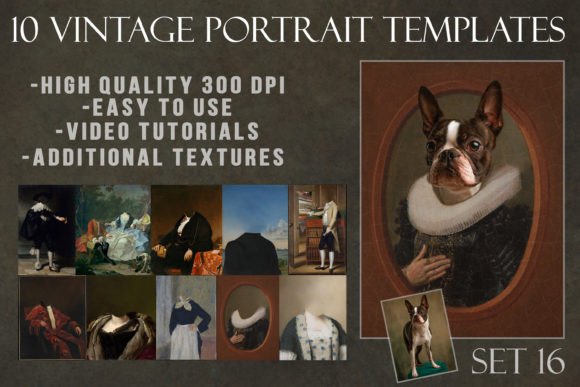
These templates are not just simple filters. They are meticulously crafted compositions that replicate the texture, color palette, and framing of vintage portraiture. The visual style leans into the rich, warm tones of aged oil paintings—think deep burgundies, golden ochres, and soft, shadowy backgrounds. The personality is one of timeless sophistication and a touch of whimsy, making it perfect for projects that need a blend of historical charm and modern creativity. The overall appeal lies in their ability to instantly elevate an image, adding layers of narrative and perceived value. For a designer or content creator, this set provides a powerful design asset to create standout social media graphics, unique brand identity elements, or memorable editorial design pieces.
Practical Applications Beyond the Canvas
The versatility of the 10 Vintage Portrait Templates Set 16 extends far beyond creating funny pet pictures, though that is a fantastic use. Consider its potential in professional spheres. A small business owner specializing in bespoke pet care or luxury goods could use a customized portrait for their logo or website hero image, instantly conveying a premium, artisanal quality. In packaging design, these templates could adorn labels for gourmet products, craft beers, or boutique cosmetics, telling a story of heritage and craftsmanship. For bloggers and publishers, they offer a solution for creating cohesive, thematic featured images for articles on history, family, or even modern topics with a nostalgic twist. The templates work best where you want to influence brand perception towards being more established, artistic, and full of character.
A Step-by-Step Guide to Your First Portrait
The process is built on fundamental Photoshop techniques. Start with a clear, well-lit photograph of your subject. A neutral or similarly toned background to the template will make the blending much more seamless. Use the Lasso tool (or your preferred selection method) to carefully cut out your subject from its original background. This is the most crucial step for a natural result. Once isolated, drag your subject layer into the template file. You will then need to mask and blend the edges to integrate it with the painted elements. For a detailed visual walkthrough, a complete tutorial is available on the "Ania Photo" YouTube channel under the Digital Painterly playlist.
Technical Specifications for Professional Use
This collection is built for serious projects. All template images are high-resolution .JPG files, ensuring they are ready for both digital and print applications. The set includes ten distinct templates, each with varying dimensions to suit different compositions:
- Template 1: 3813px x 6000px (300dpi)
- Template 2: 3671px x 4500px (300dpi)
- Template 3: 2359px x 3222px (300dpi)
- Template 4: 2519px x 3500px (300dpi)
- Template 5: 2732px x 3441px (300dpi)
- Template 6: 2882px x 3600px (300dpi)
- Template 7: 3329px x 4000px (300dpi)
- Template 8: 1166px x 1800px (300dpi)
- Template 9: 2575px x 3500px (300dpi)
- Template 10: 2300px x 2901px (300dpi)
Beyond the portraits, the package includes two additional texture files. Using these in Photoshop, you can apply them on a Soft Light blending mode to subtly enhance authenticity. The two cracked varnish textures are particularly useful; set to Multiply for a dark, aged look or Divide for a lighter, cracked effect. This layered approach gives you full creative control over the final mood.
Choosing and Evaluating the Right Template
With ten options, how do you select the best fit? Evaluate the template's existing color scheme and mood against your subject's photo. A template with a dark, moody background might suit a black-furred animal or a person in dark clothing, while a template with warmer, golden tones could complement lighter subjects. Consider the framing—some templates have more ornate borders that are perfect for a formal piece, while others might have a simpler vignette suitable for web design elements or social media graphics. Always test your subject within the template before finalizing. Does the lighting direction match? Does the subject feel integrated or pasted on? Adjustments to your subject's brightness, contrast, and color tone are often necessary to achieve a cohesive font pairing between the real and the painted elements. While this set focuses on visual assets, the principle of pairing is the same: harmony is key. For commercial projects, ensure you are using your own photographs or have the appropriate rights to the subject's image.