10 Canva Mood Board Templates for Fast, Polished Visuals
You know the drill: a client meeting is looming, a new product line needs a visual direction, or your social media content feels scattered. The spark of an idea is there, but the thought of starting a mood board from a blank canvas in Canva feels like a chore. This is precisely where a curated set of templates changes the game. It’s not about replacing your creative vision; it’s about giving it a professional, structured launchpad. These templates are the difference between spending an hour aligning boxes and spending fifteen minutes dropping in images that tell your story.
More Than Just Pretty Grids: Understanding the Templates
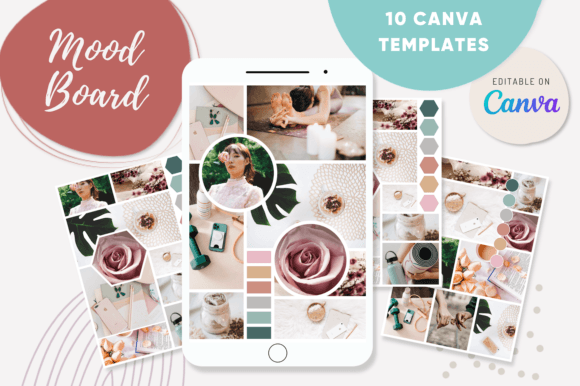
At first glance, a mood board template might seem like a simple arrangement of image placeholders. But a well-designed one, like the set of ten found in the CANVA 10 Mood Board Templates, functions as a strategic design asset. Each template has its own visual personality and layout logic. Some are minimalist, with clean lines and ample white space, perfect for a modern, sophisticated brand identity in skincare or architecture. Others are more dynamic and layered, using overlapping elements and mixed media styles suited for a vibrant social media graphics campaign or a creative blog.
The real value lies in the pre-established visual hierarchy. A template might guide the viewer’s eye with a dominant central image, supported by smaller detail shots and accent colors. This isn’t arbitrary; it’s a principle of editorial design applied to a digital canvas. The included placeholders aren’t just random shapes; they’re sized and positioned to create rhythm and balance, ensuring your final board looks considered and professional, even if you assembled it in minutes. You’re working with a framework built on design fundamentals, not just a decorative layout.
Practical Applications: From Brand Strategy to Content Creation
So, where does this kind of tool actually fit into your workflow? The applications are broader than you might think. For the entrepreneur or small business owner, it’s a fast track to developing a cohesive brand identity. You can quickly test color palettes, typographic moods, and imagery styles to see what resonates before committing to a full branding package. It’s a low-stakes way to explore whether your brand leans more towards a rustic, handwritten aesthetic or a sleek, sans serif modernity.
For designers and marketers, these templates are a lifesaver for client communication. Presenting three distinct mood board options for a packaging design or web design project becomes a streamlined process. You can demonstrate different creative directions—one focused on earthy textures and serif fonts, another on bold photography and a modern typeface—without building each from the ground up. This clarity helps clients make informed decisions and aligns the project vision early on. Bloggers and content creators can use them to plan visual themes for a month of Instagram posts or a Pinterest strategy, ensuring a consistent and recognizable aesthetic across all social media graphics.
Working Within the System: Tips for Best Results
Having the templates is one thing; using them effectively is another. The drag-and-drop functionality in Canva is intuitive, but a little intentionality goes a long way. Start by gathering your core imagery: textures, color swatches, typography samples, and key photographs that define your project’s mood. Don’t just fill every placeholder; use the template’s structure to tell a visual story. Let a large image set the primary tone, and use smaller slots for supporting details like a font pairing example or a close-up of a material.
Don’t be afraid to customize. The templates are a starting point, not a cage. Use Canva’s easy tools to adjust the background color to match your brand’s primary hue. Swap out a placeholder for a text box to add a key phrase or a premium font name you’re evaluating. The goal is to make the board work for your specific narrative. Remember, the most effective mood boards communicate a feeling and a direction at a single glance. They influence audience engagement by creating an immediate emotional connection through curated visuals, which is far more powerful than a disjointed collection of images.
Ultimately, tools like the CANVA 10 Mood Board Templates are about removing friction from the creative process. They acknowledge that sometimes, the hardest part is the first step. By providing a solid, professionally designed foundation, they free you up to focus on what truly matters: the ideas, the strategy, and the unique visual language you want to build. Whether you’re crafting a mood for a client’s logo design, planning an editorial photo shoot, or simply organizing your creative inspiration, having a reliable set of templates in your back pocket means you can move from concept to polished presentation with confidence and speed.